Mica
Product
DesktopProducts overviewAI hardware engineerAI PCB designerAsk MicaDownload
Developers Coming soonEnterprise Coming soon
Resources
DocsTutorialsUse casesCompareGlossaryFAQSecurityTransparencyUpdates
Pricing
Talk to usJoin the waitlist
Product
DesktopProducts overviewAI hardware engineerAI PCB designerAsk MicaDownload
Resources
DocsTutorialsUse casesCompareGlossaryFAQSecurityTransparencyUpdates
Developers Coming soonEnterprise Coming soon
PricingNewsTalk to us
Join the waitlist
Mica

Windows alpha. Designs stay on your computer.

Product

  • Desktop
  • Products
  • Download
  • Pricing
  • Updates

Capabilities

  • AI hardware engineer
  • AI PCB designer
  • Ask Mica
  • MCP
  • Integrations

Use cases

  • What you can build
  • Wearables
  • Connected sensors
  • Motor control
  • All use cases

Resources

  • Docs
  • Tutorials
  • Compare
  • Glossary
  • FAQ

Company

  • Security
  • Transparency
  • Careers
  • Events
  • Contact
  • Explore
  • Developers Coming soon
  • Enterprise Coming soon

Programs

  • Startups
  • Students
  • Nonprofits

Legal

  • Terms of Service
  • Privacy Policy
  • Cookie Policy
  • EULA
  • Usage Policy
  • Responsible Disclosure
  • Policies
© 2026 Mica. Mica by MuscoLabsDrafts of legal terms are pending lawyer review.

Mica

The AI hardware engineer, on your desktop.
Describe a device. Mica draws the schematic, routes the board and checks it before anything is exported.

Join the waitlistWhat works today
Local-first
Designs stay on your computer
Checked
ERC and DRC gate every export
Status
Windows, early development. No board made yet
MicaFileViewDesignVerifyAgentBLE Temperature SensorCommands Ctrl+Shift+P

Projects

  • Wi-Fi Display Board
  • Pocket Motion Logger
  • BLE Temperature Sensor
  • Rechargeable Wi-Fi Handheld

Files

  • brief.md
  • requirements.json
  • schematic.kicad_sch
  • board.kicad_pcb
  • bom.json
  • verify.json
SchematicPCBBOM3D
ANT KEEP-OUTJ1U2C1U1U3R1D1

Verify example

  • ERCPass
  • DRCPass
  • KiCad DRCPass
  • Order-readyNot yet: 2 parts with indicative stock

Chat

Route the board and run the checks.
Mica

Routed the board on this machine. ERC and DRC pass, and KiCad's own DRC agrees. It is not order-ready yet: two parts only have indicative stock.

Show each step
Ask Mica, or describe what to build nextAuto buildMica (included)
Example: the Mica desktop app, drawn in HTML for this page from the real app's layout. The project, chat and check results are illustrations.

Checked with the tools engineers already use

  • KiCad ERC
  • KiCad DRC
  • JLCPCB BOM and placement format
  • PlatformIO builds
  • LCSC part data

Named for what Mica runs or reads. No partnership or endorsement is implied.

Asks before it guesses.
One question at a time.

When a brief leaves something open, Mica asks one question with numbered options and waits for your answer, instead of filling the gap itself.

Mica asks

How should the logger be powered?

  1. 1 USB-C only, no battery
  2. 2 One Li-ion cell, charged over USB-C
  3. 3 Two AA cells
  4. 4 Something else (type it)

↑ ↓ choose · Enter send · Esc skip

Example question card, drawn for this page.

Routes on your machine.
Says what did not route.

Copper is routed locally and checked by Mica's DRC and by KiCad's. A net that did not route stays marked, and an unrouted board is never exported. Dense boards often do not route yet.

SchematicPCBBOM
ANT KEEP-OUTJ1U2C1U1U3R1D1

Routing on this machine · an unrouted net stays marked and blocks export

Example PCB view, drawn for this page. Not a real project.

Every part has a source.
Estimates say so.

The BOM shows where each stock and price figure came from: a curated estimate, a distributor, or your own quote. Curated figures are indicative, not live.

SchematicPCBBOM
Find a partRefresh stock and price
RefPartQtyStock source
U1BLE microcontroller module1Indicative estimate
U3Temperature sensor1Indicative estimate
J1USB-C receptacle1Distributor data
D1Status LED1Your quote
C1Decoupling capacitor4Distributor data
Example BOM tab, drawn for this page.

Pick the model.
The checks stay the same.

Choose which model proposes, and how much it does on its own: Ask, Plan or Auto build. Whatever it proposes goes through the same ERC and DRC.

Model Mica (included)

  • DeepSeek
  • Claude
  • GPT
  • Gemini
  • Kimi
  • More models…

Mode

AskPlanAuto build
Example. Which models appear depends on what your plan, or your own key, lists.
how it works

From a brief to an order pack

  1. 01

    Brief

    Describe the device in plain words.

    Brief

    A BLE sensor board that logstemperature to my phone.

    Read as requirements

    • Bluetooth LE radio
    • Temperature sensor
    • USB-C power
    • Status LED
    Example brief
  2. 02

    Schematic

    Mica draws the connection map. You can read it, edit it and keep it.

    J1USB-CU2LDOC1U1MCUBLEANTU3TEMPSENSORR1D1R2R3VBUS3V33V33V3D+D-SDASCLIO3V3D+D-J1USB-CU2LDOC1U1MCUBLEANTU3TEMPSENSORR1D1R2R3VBUS3V33V33V3D+D-SDASCLIO3V3D+D-
    Example drawing, not a Mica output
  3. 03

    Board

    Parts placed and copper routed on your own machine. Dense boards often do not route yet.

    ANT KEEP-OUTJ1U2C1U1U3R1D1
    Example layout, not a Mica output
  4. 04

    Checks

    ERC and DRC decide, not the model. A board that fails is shown as failed.

    Design rules6 of 6 checked

    1. Electrical rules (ERC)Pass
    2. ClearancePass
    3. Track widthPass
    4. Drill and annular ringPass
    5. Copper to board edgePass
    6. Unconnected netsPass
    Example run
  5. 05

    Order pack

    Factory files, written only for a board that passed every check.

    Order packWritten

    • Gerber files copper, mask, silkscreen, outline
    • Drill file holes and vias
    • Pick-and-place where each part sits
    • Bill of materials with a trust label on every part
    • KiCad project netlist and layout
    • Case STEP and 3MF
    Example file list

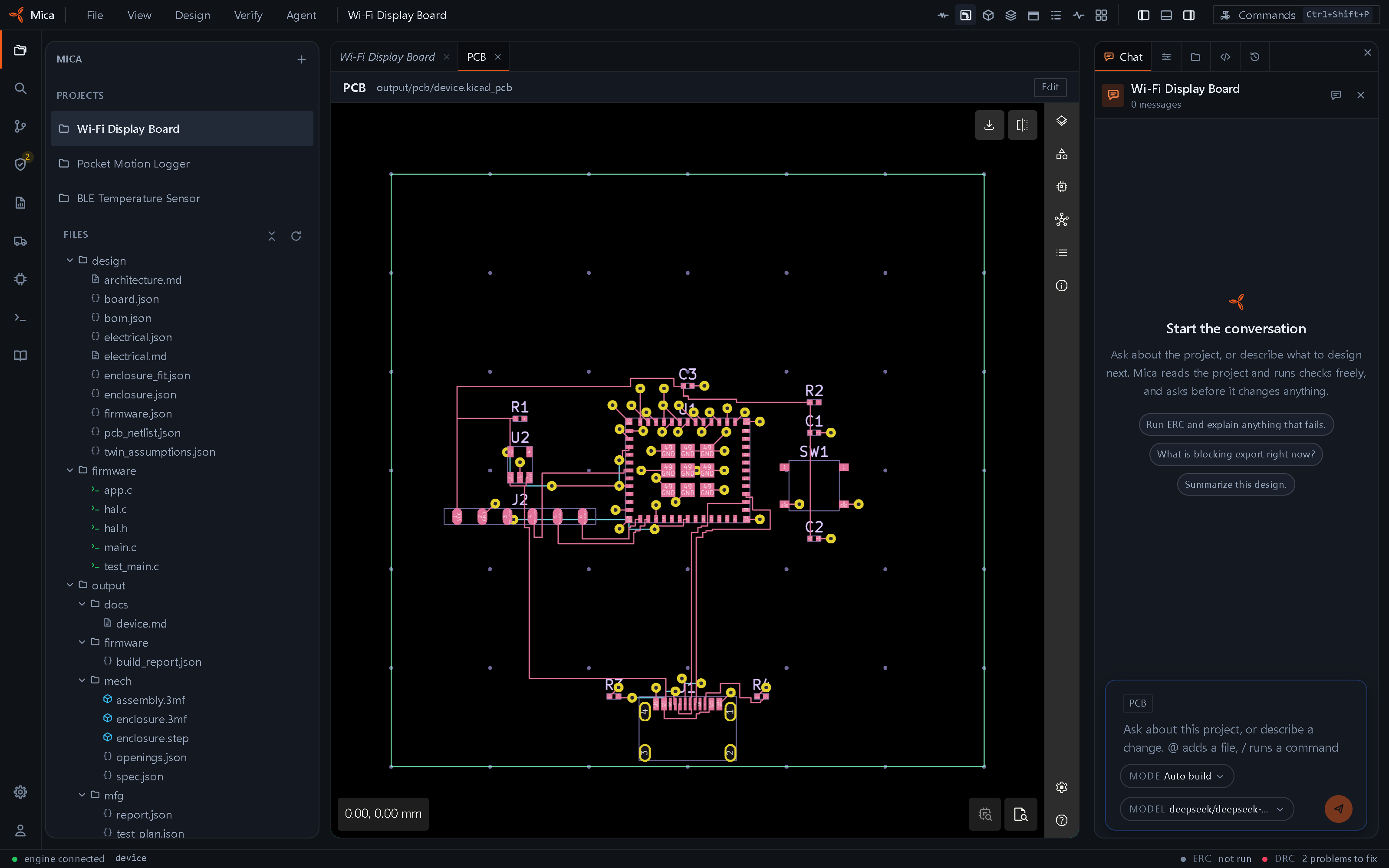
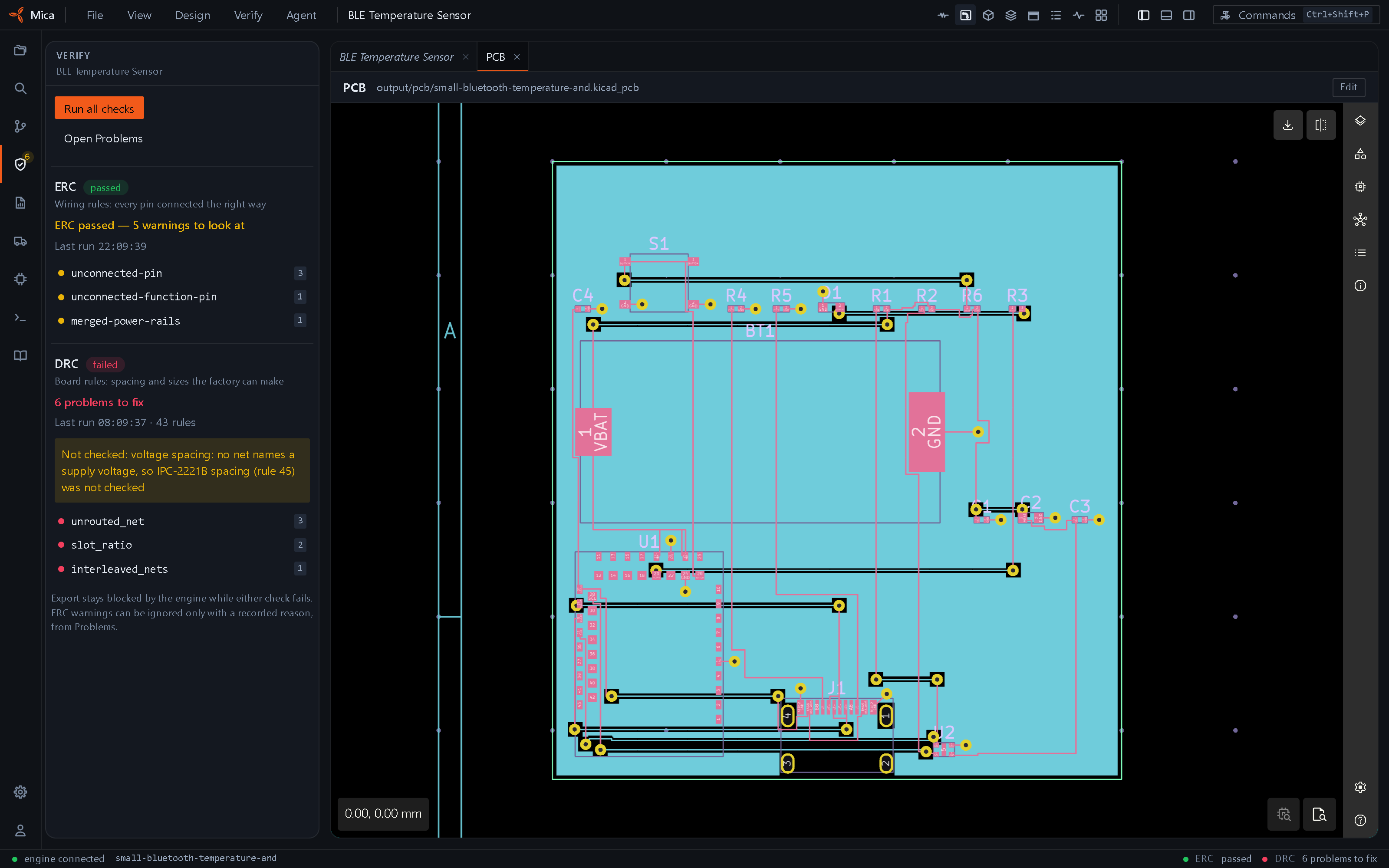
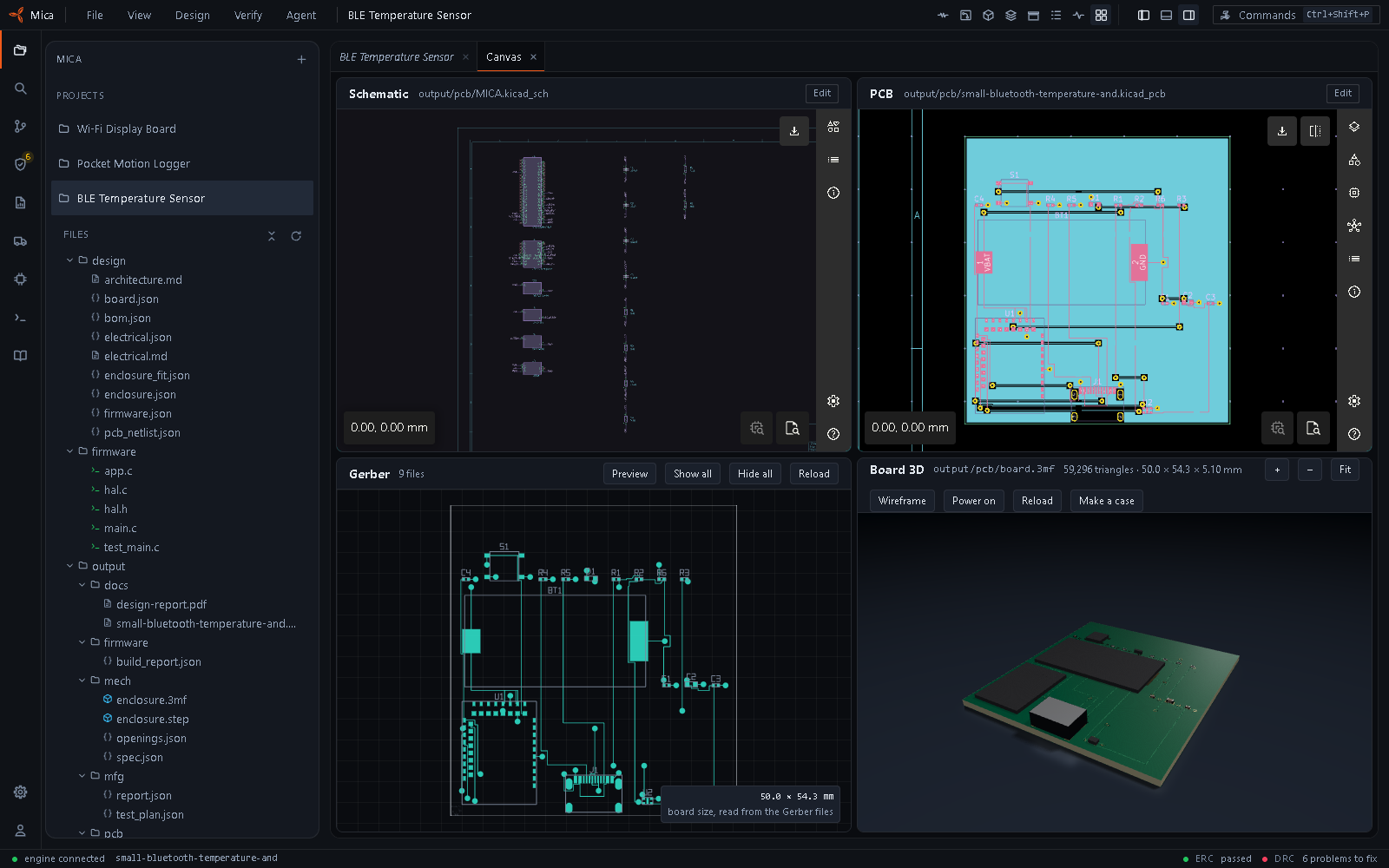
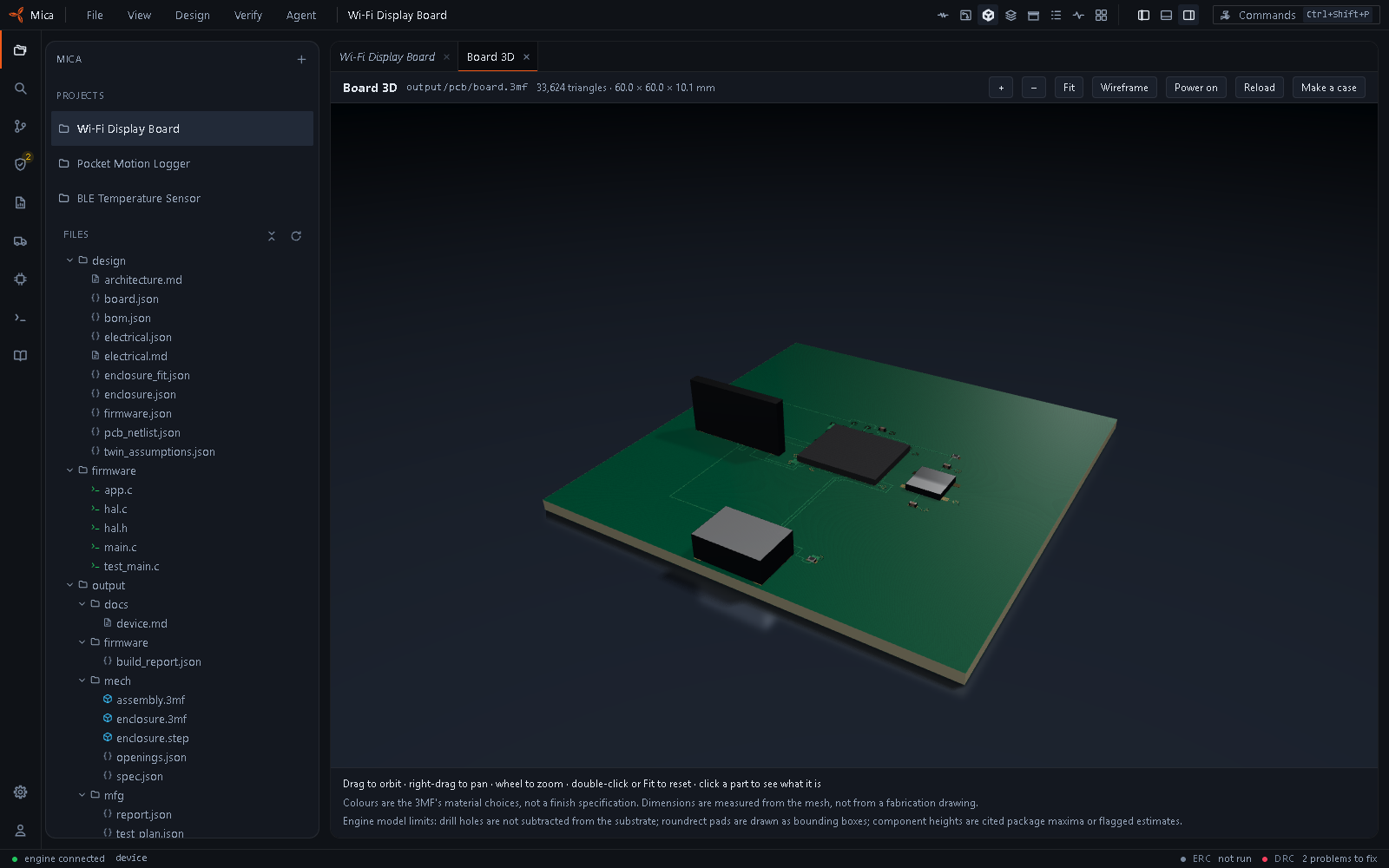
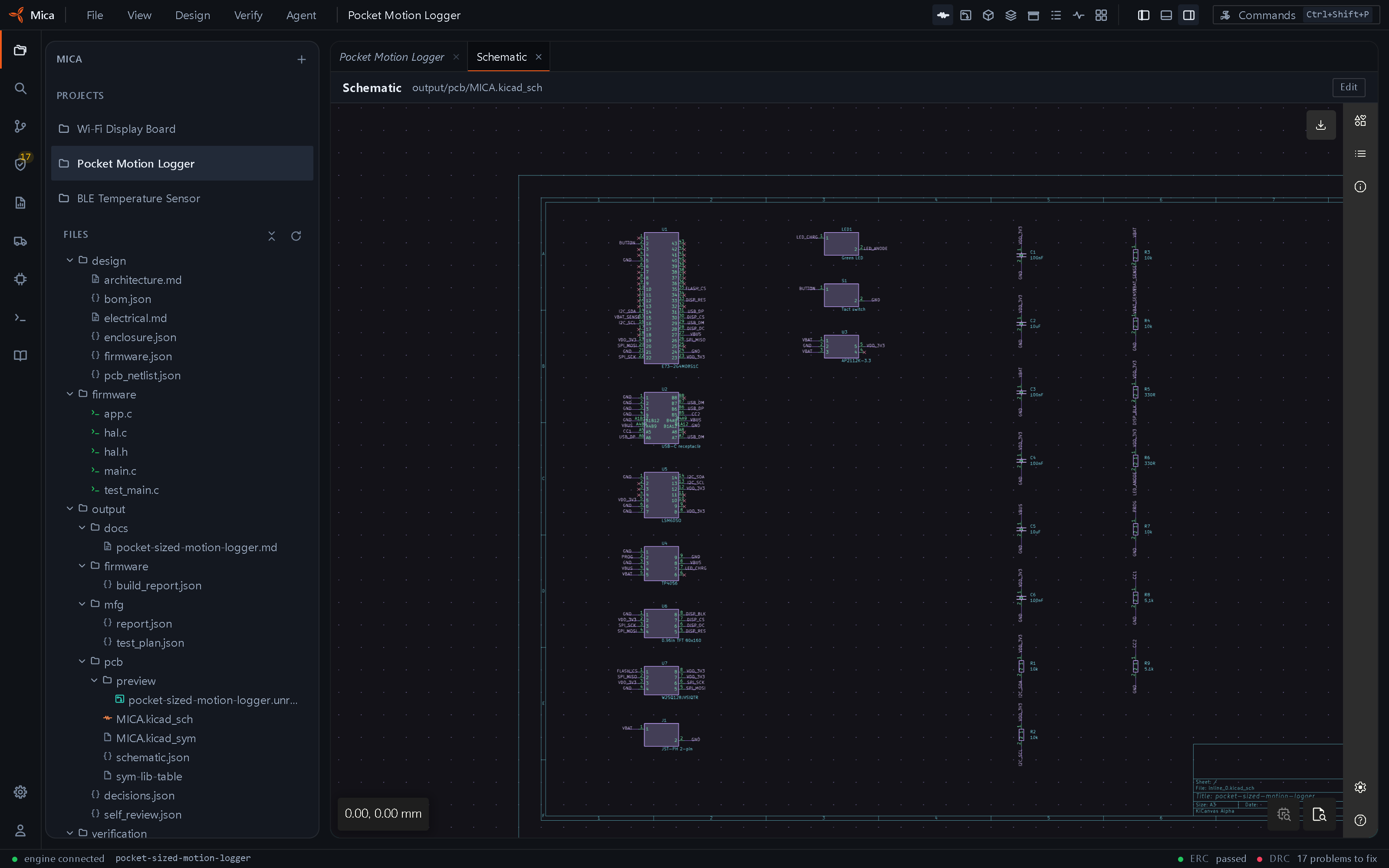
Every screen here is a real Mica project, captured in the app. One still fails six design checks, and Mica says which.
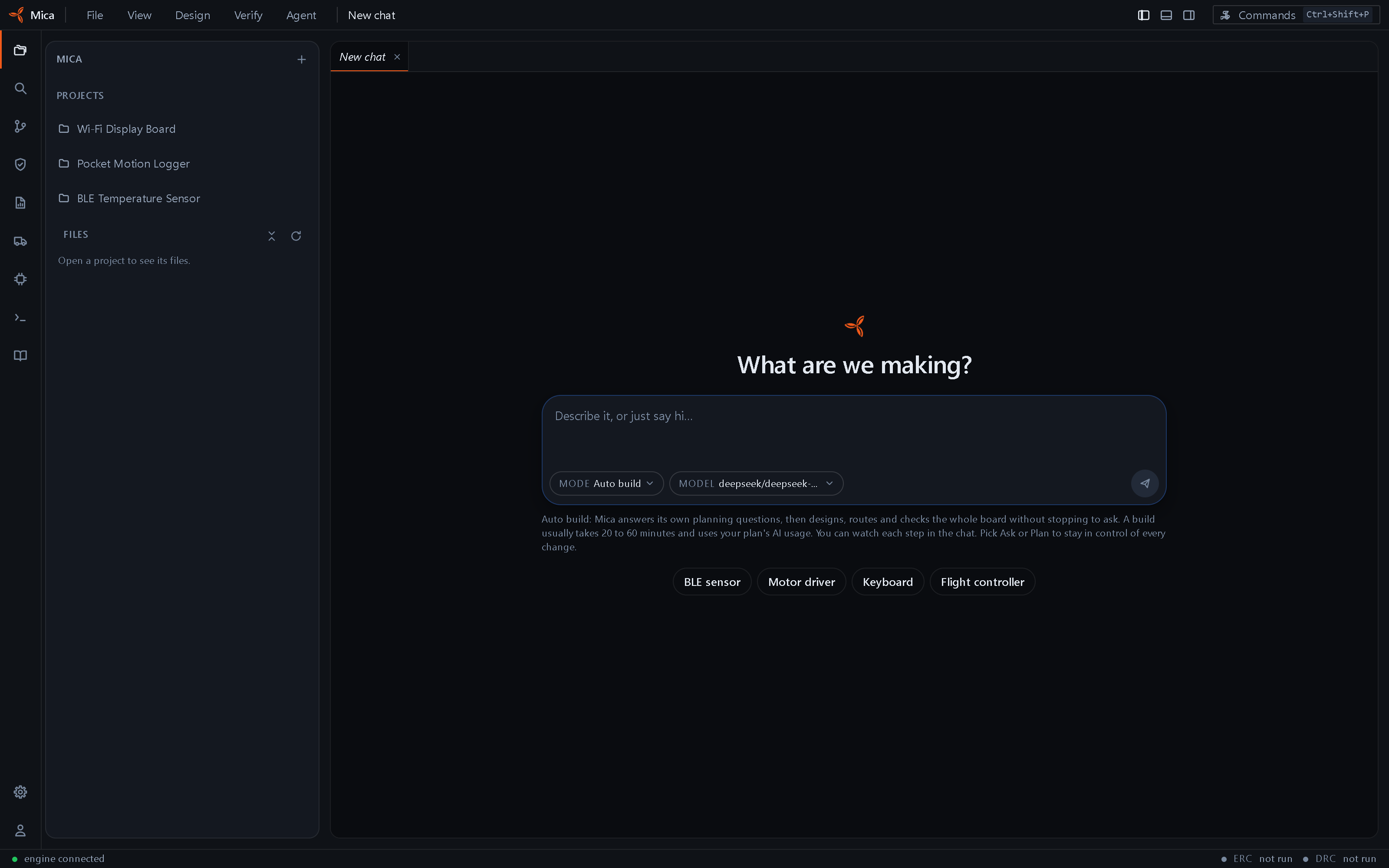
The Mica desktop app on first launch
Start DESKTOP
The schematic of the Pocket Motion Logger in Mica
Schematic MOTION LOGGER
The PCB of the Wi-Fi Display Board in Mica, with the chat beside it
PCB WI-FI DISPLAY
ERC passed with warnings and DRC failed with 6 problems on the BLE Temperature Sensor
Checks BLE SENSOR
Canvas mode: schematic, PCB, Gerber and enclosure of the BLE Temperature Sensor on one screen
Canvas ALL VIEWS
The Wi-Fi Display Board in Mica's 3D view
3D WI-FI DISPLAY
faq

Frequently asked questions

What does Mica produce?

When a build succeeds: a routed PCB, factory files (Gerber, drill, pick-and-place, BOM), KiCad files and a 3D case. Firmware for a real chip is not done yet, and no board Mica designed has been made so far.

Does Mica run in the cloud?

Your files stay on your computer, in a local git repository, with no cloud sync. What you type and the project details Mica needs go through Mica's model gateway, which does not log or store them, to the maker of the model you pick.

Does the AI decide whether a board is good?

No. Models propose. ERC, DRC and compilers judge the result, a board that fails is shown as failed, and it cannot be exported.

Which platforms are supported?

Windows, in early development. There is no public download yet. macOS and Linux are planned.

What does it cost?

Nothing is on sale yet. Planned pricing is a Free plan and Pro at $19 a month, with a 14-day free trial of Pro. Both include the AI models, so you never need your own API key. Usage is counted in a 5-hour session window and a weekly window.

Follow Mica as it gets there

Mica is not ready to try yet. The waitlist hears first when it is.

By joining, you agree to our Privacy Policy. We will only email you about Mica’s launch, and you can ask to be removed at any time.

Planned: Free, and Pro at $19/month. Your files stay on your computer.